28 Jun 2026
Rebuilding Legal Workflows with HTML Forms
Turning dense legal guidance into an approachable, interactive workflow with structured inputs and Word export.
Overview
I have become a fan of interactive HTML tools as a medium for presenting information. A well-designed page is easier on the eyes than a dense Word document and can organise the same material through visual hierarchy, navigation and interactive elements.
Dense guidance has a practical cost. I saw this during my time in private practice: many clients did not want to read through lengthy analysis. They would ask for a succinct summary at the start, or to be told the overall conclusion and risk assessment first, then turn to the detail in a particular section only when it mattered to them.
The same is true for internal stakeholders. A long document, particularly one split across several files, increases the chance that the guidance will be skimmed or never opened. A browser-based tool can present the core message first and reveal detail only when it becomes relevant, a pattern interface designers call progressive disclosure.
Interactive HTML tools also make it possible to create a one-stop landing page. A single page can combine guidance, questions, conditional prompts, calculations and saved progress. Because JavaScript can be bundled into the page, completed inputs can also be exported to Word for comments, regulatory submission or record-keeping.
AI-assisted coding makes these bespoke tools practical to build. The point is not to dress old content in new clothes by converting a Word document into a web page. It is to rethink how that content is delivered and used, turning static guidance into a more accessible workflow.
My Use Case
I have used this model for several internal tools. One example is a trilingual self-assessment built for an Indonesia minor protection framework.
Indonesia minor protection assessment
Multiple game titles and teams within Tencent needed to complete the same assessment. The traditional approach would have involved two Word documents: guidance explaining what the law required, and a questionnaire capturing each product’s response and level of compliance. Legal would then review the answers, identify gaps and conduct further verification with each team.
The new approach combines those steps in one trilingual form covering English, Chinese and Bahasa Indonesia. It places targeted guidance (in both English and Chinese) beside each question, shows explanation fields when needed, tracks completion and calculates results as answers are entered. Every participating title uses the same tool and receives the same guidance.
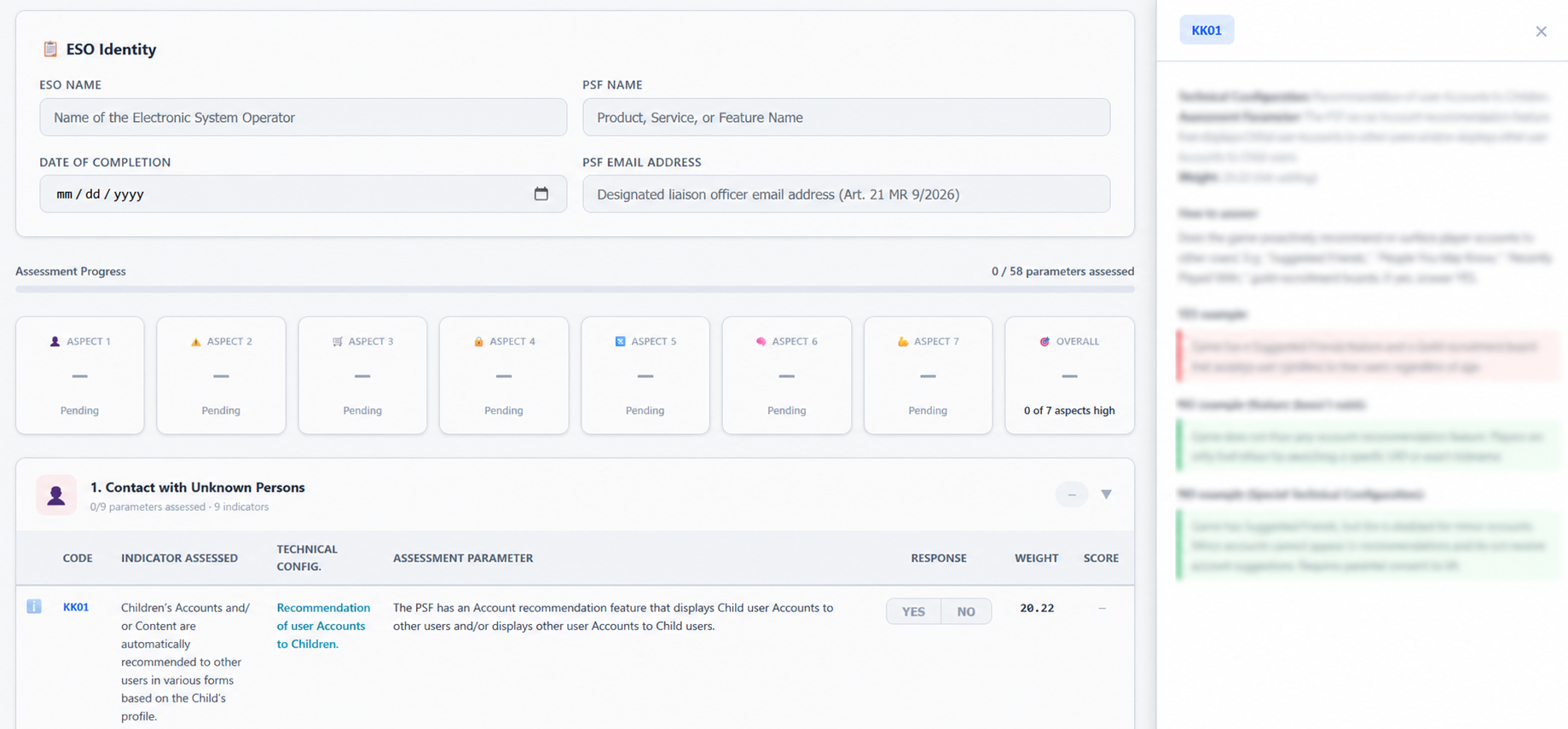
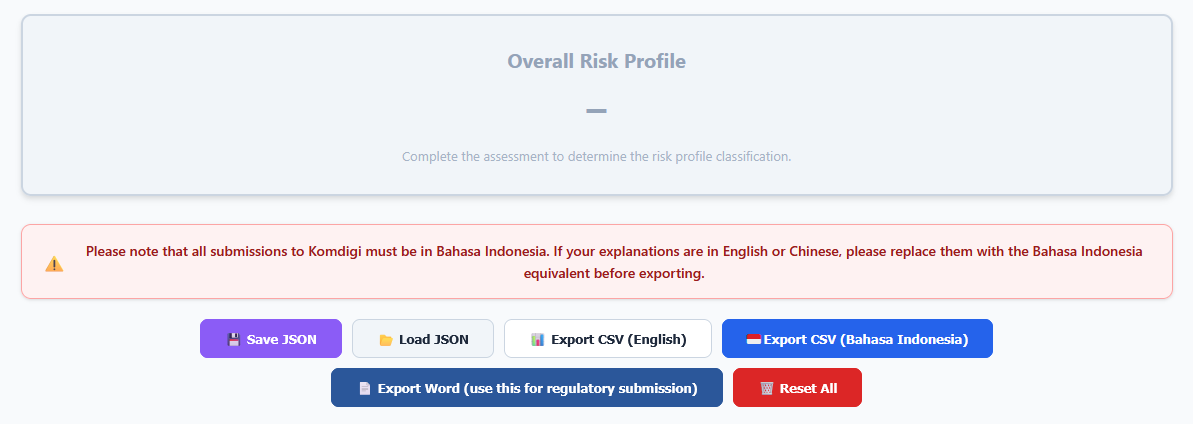
The form can save progress for later review and export the completed answers directly into the Bahasa Indonesia Word format required by the regulator.
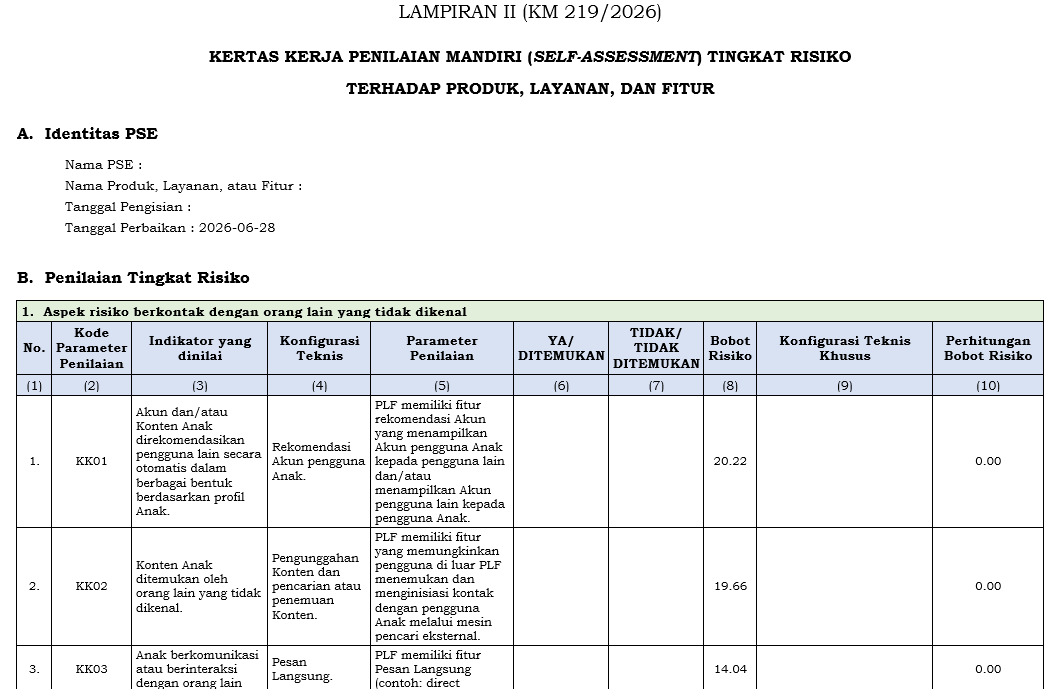
The exported document follows the prescribed structure and remains editable. Legal can review it, make further revisions and retain the final submission as a record without rebuilding the document manually.
This model scales because each product team works through the same questions, guidance and output process. Legal receives more consistent information and can focus on verification and judgement rather than chasing missing answers or reformatting submissions.
The self-assessment form and its Word output may have to be adjusted whenever the legal requirements or prescribed format change. That maintenance is part of treating the tool as a working legal product rather than a one-off document.
The broader point is the workflow. Interactive HTML tools can unify guidance, structured input, calculations and export instead of splitting them across static Word documents. That gives product teams a clearer experience and gives legal better information for review, verification and record-keeping.
Back to AI Journal